
Starting Monday, September 15, 2025 students will be able to request late registration adjustments through Vergil. This new workflow tool will replace the Post/Add Drop functionality in SSOL.
You may use different terminology when referring to various Registration Adjustment processes. To ensure a smooth transition, this page contains:
- A table outlining Registration Adjustment Workflow scenarios, settings, and potential approver(s).
- A glossary contains relevant terms referenced during the Vergil Registration Adjustment period along with their definitions and impact areas.
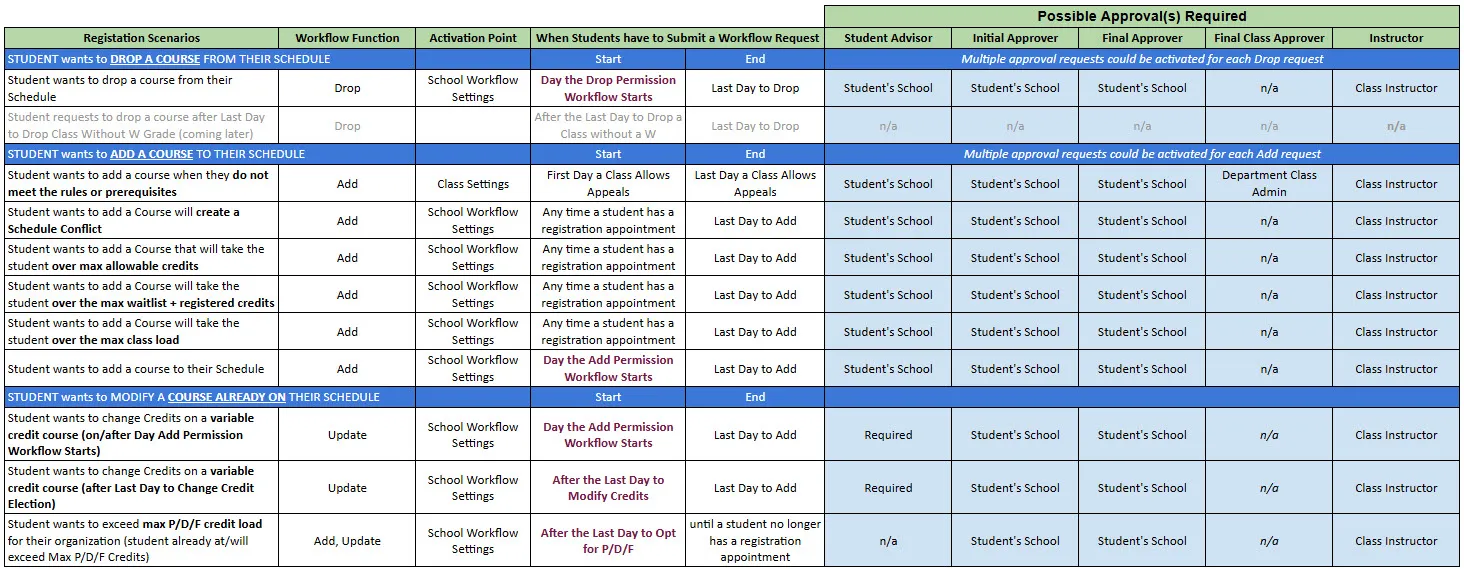
Registration Adjustment Workflow Scenarios, Settings, and potential Approver(s)
Contact [email protected] with any questions on terms not listed on this page or related inquiries.
Registration Adjustment Workflow Glossary
FIELD- Add/Drop
AREA(S) OF IMPACT- Add/Drop Workflow
DEFINITION- This refers to students requests for entry into courses that require exceptions to their School's policies. ADD: Course available for this will have a blue 'Add Request' button. DROP: Students should click 'Manage Registration' to open the Drop Modal and submit a request to Drop.
Approved by: These settings are approved by the Student's School.
LOCATION/MANAGED BY- Approval Requests/ Student's School
Appeal Settings and Dates/ Determined by School - Managed by Registrar
FIELD- Appeal(s)
AREA(S) OF IMPACT- Student Registration Appeals
DEFINITION- This refers to student requests for entry into courses whose rules/requisites they do not meet. They will see a blue 'Appeal' Button to request entry.
Note: Courses and Class sections within the same term can have different Appeal Start and End Dates, and settings to Allow/Block students from appealing for entry.
Appeal Scenario(s):- Unmet Class Rules
- Unmet Prerequisites
- Class is Full
Approved by: These requests will be reviewed and approved by the department who mounts the course. This may also potentially require the Student's School approval - depending on the student's school-level settings.
LOCATION/MANAGED BY- Approval Requests/ Department who mounts the course(s)
Appeal Settings and Dates/ Department who mounts the course(s)
Appeal Start & End Dates (Academic Calendar)/ Registrar
FIELD- Day Add Permission Workflow Starts (Post-Add/Drop Period)
AREA(S) OF IMPACT- Add/Drop Workflow
DEFINITION- The first day students will be required to submit schedule adjustment requests for approval. This is typically after the semester Change of Program period.
Add requests are approved by the student's School administrators and advisors.
LOCATION/MANAGED BY- Course Management: Academic Calendar / Registrar
FIELD- Day Appeal Workflow Starts
AREA(S) OF IMPACT- Student Registration Appeals
DEFINITION- The first day students can submit requests to appeal for entry into course sections where they do not meet the rules.
Examples include:- Unmet prerequisites
- Unmet class rules
- Schedule Conflicts
LOCATION/MANAGED BY- Course Management: Academic Calendar / Registrar
Semester Schedule: Individual Course Record/ Department Class and Schedule Admins
FIELD- Day Appeal Workflow is Closed
AREA(S) OF IMPACT- Student Registration Appeals
DEFINITION- The last day students can submit requests to add a course where they do not meet the rules. Reasons for a request include:
- Unmet prerequisites
- Unmet class rules
- Class is Full
LOCATION/MANAGED BY- Course Management: Academic Calendar / Registrar
Semester Schedule: Individual Course Record/ Department Class and Schedule Admins
FIELD- Day Drop Permission Workflow Starts (Post-Add/Drop Period)
AREA(S) OF IMPACT- Add/Drop Workflow
DEFINITION- The first day students will be required to submit drop request through an approval process. Drop requests are approved by the student's School administrators and advisors.
LOCATION/MANAGED BY- Course Management: Academic Calendar / Registrar
FIELD- Last Day to Add Class
AREA(S) OF IMPACT- Student Registration
Add/Drop Workflow
Student Registration Appeals
DEFINITION- The last day a student can request to add a course, either directly or through an approval request in online Vergil Student Registration.
LOCATION/MANAGED BY- Course Management: Academic Calendar / Registrar
FIELD- Last Day to Drop Class
AREA(S) OF IMPACT- Student Registration
Add/Drop Workflow
Student Registration Appeals
DEFINITION- The last day a student can request to drop a course, either directly or through an approval request in online Vergil Student Registration.
LOCATION/MANAGED BY- Course Management: Academic Calendar / Registrar
FIELD- Last Day for Student to Complete Approval Request Acceptance
AREA(S) OF IMPACT- Add/Drop Workflow
Student Registration Appeals
DEFINITION- The last day a student can accept a Registration Adjustment decision to add, drop, or change a course to their semester schedule. Once a student has accepted the decision, the course will be added/dropped/changed.
LOCATION/MANAGED BY- Course Management: Academic Calendar / Registrar
FIELD- Registration Adjustment Period
AREA(S) OF IMPACT- Add/Drop Workflow
Student Registration Appeals
Approvers/Students
DEFINITION- This is the period of time after the Change of Program period when registration adjustment must be submitted through a formal request process in Vergil.
Note:
Schools may have different Registration Adjustment Periods.
Departments may have different Appeal dates for individual course.
LOCATION/MANAGED BY- Academic Calendar/ Registrar
Appeal Dates/ Department who mounts the course(s)
Add/Drop/Change Dates/ School the student is enrolled in
FIELD- Registration Adjustment Workflow
AREA(S) OF IMPACT- Add/Drop Workflow
Student Registration Appeals
Approvers/Students
DEFINITION- This term refers to the functionality, settings, and tools that allow students and approvers to manage registration adjustment requests. It includes Appeal requests, Add/Drop/Change requests.
LOCATION/MANAGED BY- Managed by the Registrar
FIELD- Registration Requests
AREA(S) OF IMPACT- Add/Drop Workflow
Student Registration Appeals
Approvers/Students
DEFINITION- Requests submitted by students appealing for entry into a course whose rules they do not meet or requesting permission from their School Administrators to Add/Drop/Change courses on their semester Schedule
LOCATION/MANAGED BY- Registration Request Log/ Students & Approvers
FIELD- Registration Request Log
AREA(S) OF IMPACTAdd/Drop Workflow
Student Registration Appeals
Approvers/Students
DEFINITION- A filterable log containing Pending/Approved/Denied requests with relevant comments and attachments. The log can also be bookmarked to return to at any point.
- Student logs will contain Cancel and Accept buttons
- Approver logs will contain Approve/Deny Buttons
LOCATION/MANAGED BY- (Approver) Dashboard/ Approver(Student) Dashboard and Course Search/ Student