
This page is a resource for all topics related to this new electronic Registration Adjustment process:
- Identifying Appeal and Add/Drop Requests
- The Request and Approval Process
- Managing your Registration Requests
Please reach out to [email protected] with any questions related to Registration Adjustments.
Submitting Registration Requests
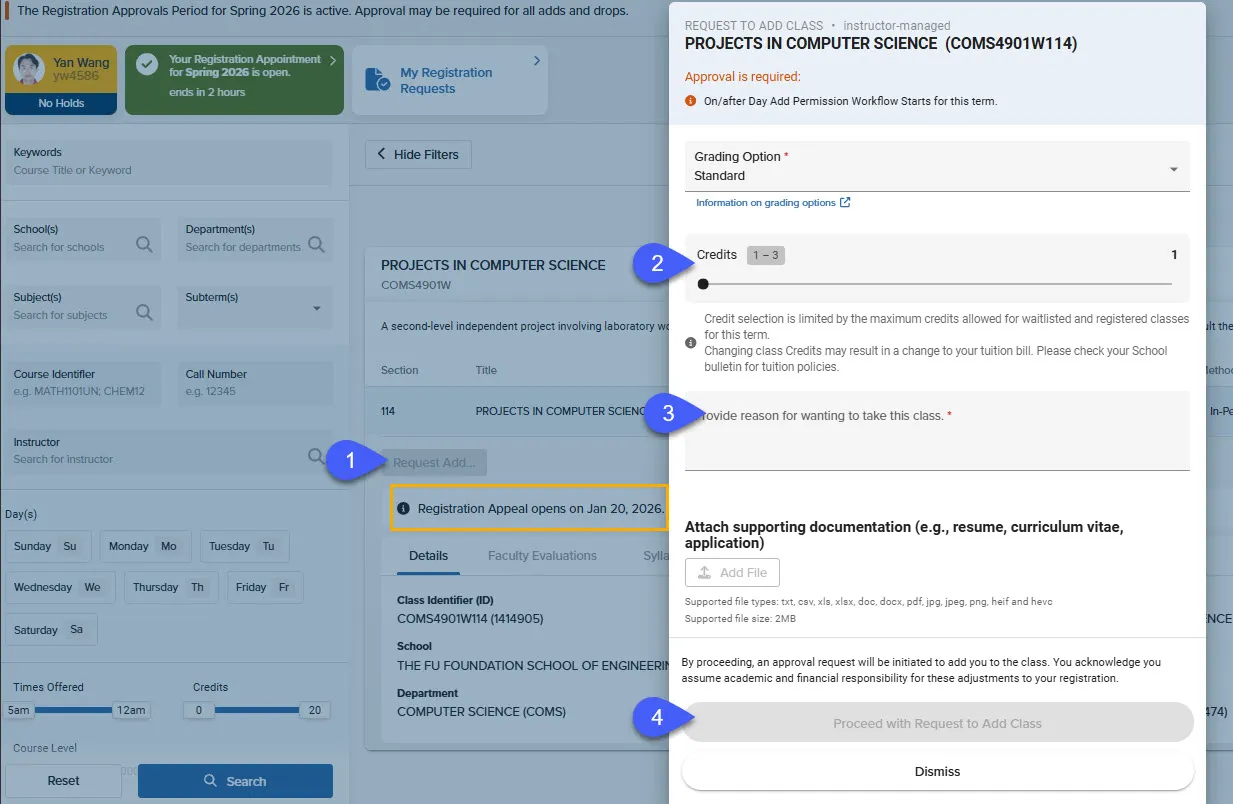
Registration Appeals are required when a course has a class rule(s) or prerequite(s) that you do not meet, or has reached capacity. Course sections may open their Appeals on different dates. Details on when a specific section will accept appeals is available in the course details window in Vergil (highlighted in yellow in the image below).
Review the 'Appeal Request Scenarios' section for information on when an Appeal Request is required.
Add Requests are required after the Change of Program, during the Registration Adjustment Period.
Contact your Advisor or Student Affairs office for information on when your School's Registration Adjustment Period closes.
Important Reminder: If an Appeal or Request Add button is not visible, your School or the course's Department may not allow requests for the conflict reason displayed on the course details window. Contact your advisor or student affairs office for more information.
To submit an Appeal or Add Request:
- Expand the Course Details Window in Vergil Course Search and click 'Appeal' or 'Request Add.'
- (Optional) Select desired credit value and/or Grade Option.
- Provide a reason for the request.
- Click on the blue 'Proceed to Request Add' button.
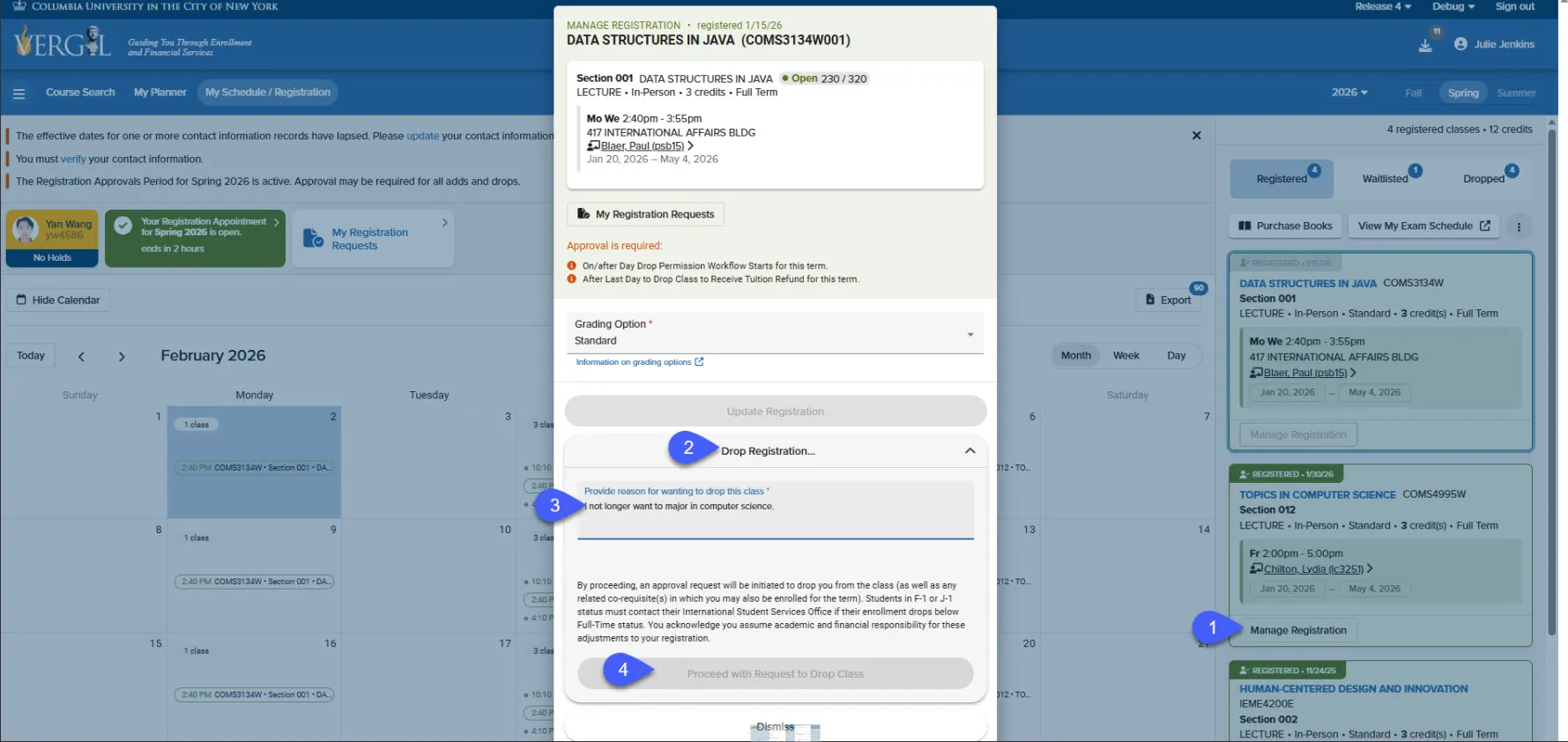
Drop and Credit/Grade Option Change requests can be completed in the Manage Registration Window in the My Schedule/Registration page.
To submit a Drop or Change Request from your Schedule:
- Click Manage Registration
- Click Drop or desired Credit Value and/or Grade Option.
- Provide a reason for the request.
- Click on the blue 'Proceed to Request Add' button.
Managing Registration Requests
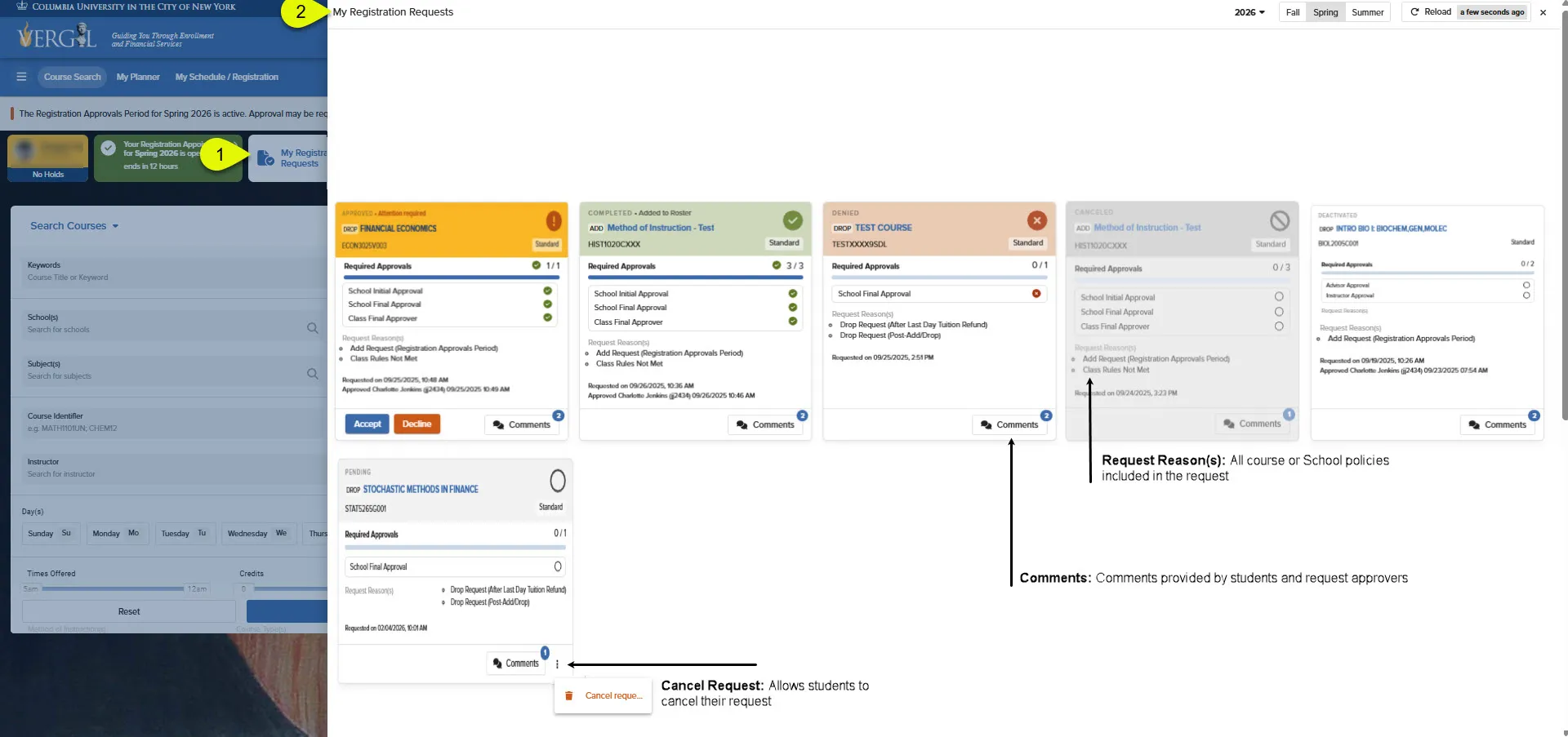
The My Registration Request dashboard contains information on all requests you've submitted in the selected year and term, inlcuding the:
- Request Status
- Request Reason(s)
- Registration Location (e.g., Wait List or Course Roster)
- Requested Date and Approval progress
- Comments
View your Registration Request Log via the Vergil Dashboard, Course Search, Planner, and My Schedule/Registration pages by clicking the My Registration Requests button.
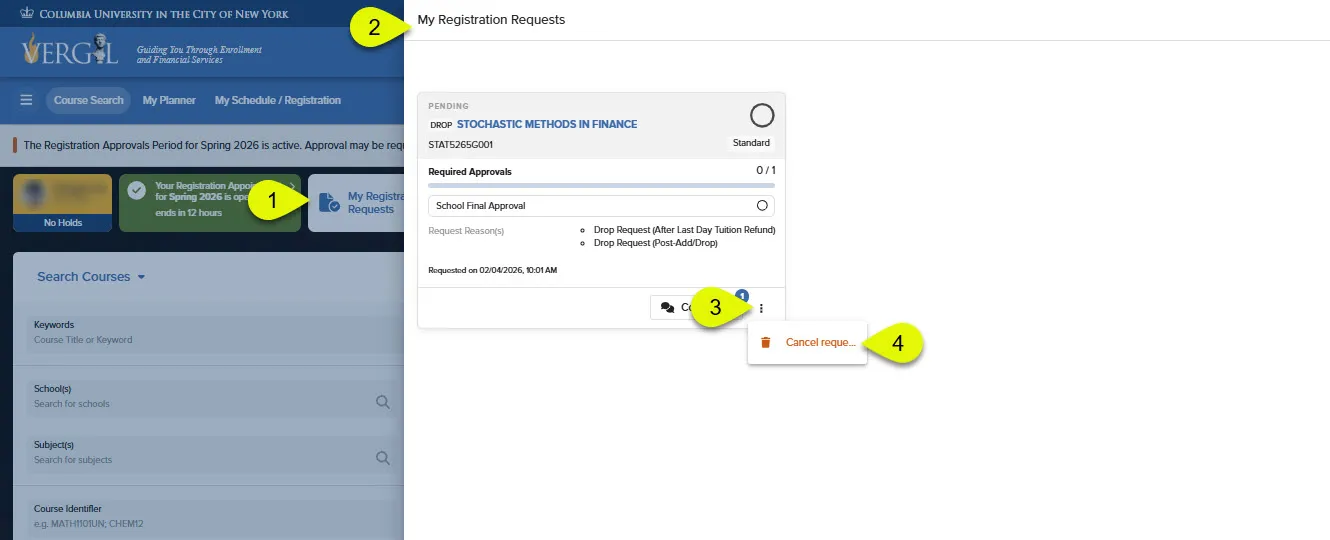
To Cancel your request(s):
- Open your My Registration Request Dashboard.
- Click on the three stacked circles.
- Click 'Cancel Request.'
Please see the visual reference below for guidance.
When are Appeals/Add Requests Available?
What is the timeline for Appeals?
Appeal Requests can be submitted beginning at the start of the term, throughout the Registration Adjustment period (following change of program), and up until your School's designated last day for registration actions in Vergil.
Note: Appeals will deactivate after a period of time determined by your School.
When are Appeals Required?
Appeals are required when a student does not meet the course section requirements, including when:
- A Course Section is Full, and/or
- The student does not meet the Class Rules, and/or
- The student has not completed the course prerequisites.
How do I know if I do not meet the rules or prerequisites?
An orange conflict message will be displayed on the course window, indicating which requirement(s) you do not meet.
What if I don't see an Appeal Button?
The course may not accept appeals for entry, or appeals may not yet be open for the section.
Please see the Registration Appeals and Add Requests Section for visual references to confirm when the course may begin accepting appeals.
What is the timeline for Add/Drop Requests?
An add/drop request will be required after the Change of Program Period and up until your School's designated last day for registration actions in Vergil.
Note: Appeals will deactivate after a period of time determined by your School.
When are Add/Drop Requests Required?
Depending on the conditions a student's School allows, students may submit requests to Add Courses:
- After the Change of Program Period
- Exceed their allowable number of waitlisted credits, class count, waitlisted + registered credits, P/D/F courses, or Schedule conflict
Drop Courses
- After the Change of Program Period
- After the last to receive a W
- After the last day to receive a tuition refund
Modify
- After the Change of Program period
- Elected value for variable credit courses
- Course Grading Option
How do I know I do not meet the rules or prerequisites?
An orange conflict message will be displayed on the course window
What if I don't see an Appeal Button?
The course may not accept registration adjustment requests for the conflict message displayed, or your school may not participate in the adjustment process.
Contact your advisor or student affairs staff for more information.